Guide

Scrape Request Guide

This guide shows what information helps us scope accurately, quote faster, and deliver exactly what you need.

1) What to include in your request

Target website(s)

  • Target website(s): list the main domain(s) you want us to scrape (e.g., example.com).
  • State if scope is full-site or only specific categories/locations/URL lists.
  • If this is a partial scrape, provide the starting URLs: category pages, search pages, location pages, newest-listings pages.
One-time or recurring scrape

  • One-time scrape: run once and deliver one dataset.
  • Recurring scrape: weekly, monthly, or custom schedule.
  • For recurring projects, include whether you want a full refresh each run or new-record-only updates (where we scrape only newly added records). New-only updates are great for directories, marketplaces, and job boards where listings appear regularly.

Fields to extract per record

  • A record can be a product, listing, company profile, job post, article, etc.
  • List the fields you want extracted. Product fields can include: name, price, SKU, availability, description, image URLs, and specs.
  • Company fields can include: name, category, address, phone number, email address, and social links.
  • If unsure, share 1-3 example record URLs and we can suggest a field list.

Field format

  • Fields can be extracted as text (plain text, trimmed), HTML (raw HTML block from the page; useful for rich descriptions), numbers, links, and lists.
  • For lists, specify JSON arrays, comma-separated values, or split columns (e.g., image_1, image_2, image_3).
  • Examples: product_name → text, description_html → HTML, image_urls → list of links (comma-separated in an Excel cell), specifications → JSON.

2) Fast ways to describe which fields to extract

Option A: Screenshot with highlights

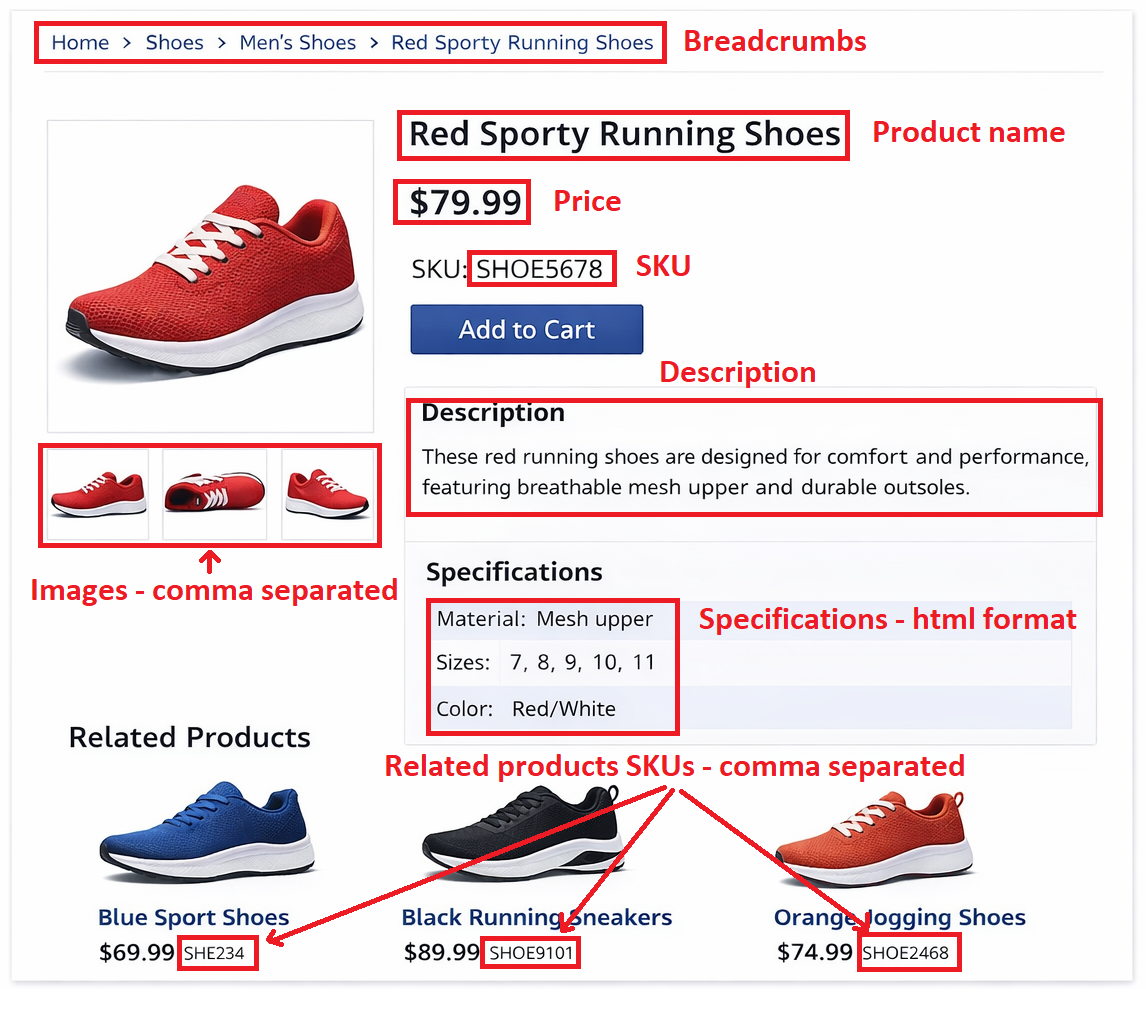
Take a screenshot of an example record page and use any image editor to highlight each data point you want and label each field name and desired format (text/HTML/list). Attach the image to your scrape request.

Option B: Describe fields in the form

Share 2-3 example record URLs, the exact fields you want from each record, the field format (text, HTML, list, JSON, etc.), and notes on tricky data points.

Option C: Output template

If you already have a spreadsheet structure in mind, attach a template with the column names you want. You can also fill out the data for 1-2 records as an example.

Attaching a screenshot with highlighted fields and clear labels is the fastest way for us to understand your exact requirements. It helps us scope accurately and reduce back-and-forth.

An example screenshot is shown below.

Example of highlighted scrape field requirements on a page screenshot
Example: highlight each required field directly on a screenshot.

3) Typical scrape workflow

A standard scrape follows this pipeline, from your entry points to validated delivery files.

Step 1: Discover list pages

We start from your entry points (home/category/location/search pages). The scraper finds all list pages and navigates through them. It can handle pagination (page 1, 2, 3, and so on), “Load more” buttons, infinite scrolling, and filter/sort controls.

Step 2: Extract record URLs

On each list page, we collect record URLs (product, listing, or profile pages).

For recurring incremental scrapes, we compare URLs to previous runs and identify only newly added records.

Step 3: Visit records and extract fields

The scraper opens each record page and extracts the exact fields you requested.

If needed, we handle tabs, “Read more”, lazy-loaded blocks, and small in-page interactions before extracting.

Step 4: Save, validate, and deliver

We store the extracted data, run validation checks, and deliver files in CSV, Excel, or JSON.

For recurring projects, delivery is either full refresh or new-only output, based on the agreed update rule.

Ready to submit?

Send your request now and we’ll review feasibility, scope, and next steps.

Quick feasibility response and sample preview available.